Now don't get me wrong, I love a good TUI
Hell, all the programs I've written have been either web-GUIs or TUIs.
Shameless plug to feedie if you haven't seen it already.
No need to worry about theming, being able to access it over ssh, Vim style-controls nearly ubiquitous, decent scaling, what's there not to love?
The problem is that terminals were not intended to be GUIs.
Back when a terminal was a terminal,

You had these symbols:
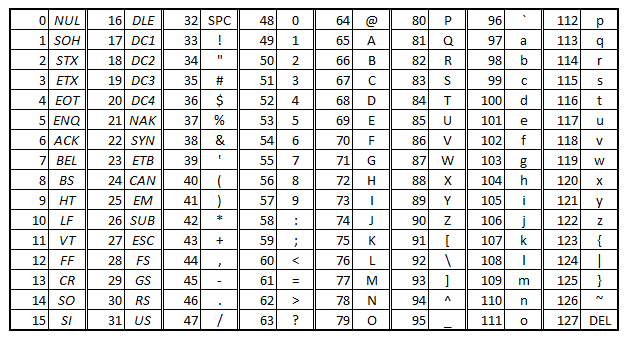
Note the first 31 of those are just control codes, including #7, the terminal bell, which I share a love-hate relationship with.
It just typed text. Far easier than punch cards. Eventually they stopped using paper altogether and adopted screens. Besides the physical closing of the keyswitches, it was digital end-to-end.
Computers continued to evolve and proved to be more capable. Yet for a myriad of reasons, it was important to preserve that simple interface, and we still use it to this day. Sure it picked up a few new sets of codes along the way, and quite a few more characters, but you still log in at a TTY.
The atomic unit of the terminal is the cell. For teletypes each cell matched the dimensions of the typebar, for terminal emulators they are a fixed set of pixels wide and tall, determined by your font. Herein is the kernel of almost every problem.
Resolution and centering
My 1920x1200 pixel display, with a maximized terminal window, has 63 rows and 192 columns. That gives me 12,096 characters to work with, not bad. However, most of the time I don't just run my computer with the terminal maximized, most of the time it is in a window with 30 rows and 75 columns, 2250 characters, significantly less. Not to mention you probably want to have a border for your TUI app so more like 28 rows and 73 columns, even less. And you can't fill every single cell, you have to have some whitespace in between data in order to have each piece recognizable as separate from the previous. Overall, you have a lot less space to work with than if you were to be working with a true GUI, where you can use a far more granular atomic unit, the pixel.
For instance, let's say you have a TUI composed of two panes that take up half the window each. The window can either be an even or odd amount of units wide.
In the case of a GUI with an odd window width, you'll have (2k + 1) pixels to work with, with each pane being k pixels wide and k+1 being the separator line. In the even pixel scenario, it's not quite as simple and is handled differently between toolkits. You can either make one pane 1 pixel wider than the other, which is nearly imperceivable on our modern, pixel-dense displays, or you could do some anti-aliasing tricks to make the line still appear to be at the exact center.
It is handled similarly with a TUI. An odd cell width can be split exactly down the center, and an even one can be split into two equal sized panes. The issue is that you can't consistently draw the same border for both scenarios like you more or less could with a GUI. In the odd scenario, you can have each cell share the center column as a border, using 1 cell. In the even scenario, you can't, so you either use some ascii tricks to make the two columns appear to be the same width as if it were a single column, or you don't. You just make 1 pane 1 cell wider than the other, or throw out that extra column. The ascii tricks solution is highly dependent on what border style you are using and the available symbols. Making one pane wider can make the TUI look asymmetrical, so most programs just throw out a column. This makes the programming really simple, since pane_width = window_width/2 will always yield the correct width no matter if the window width is odd or even due to the extra .5 being thrown out with integer division.
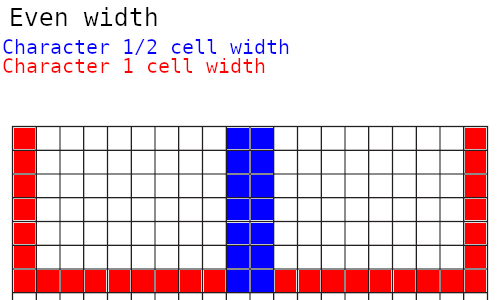
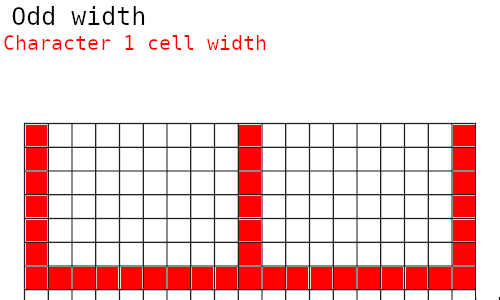
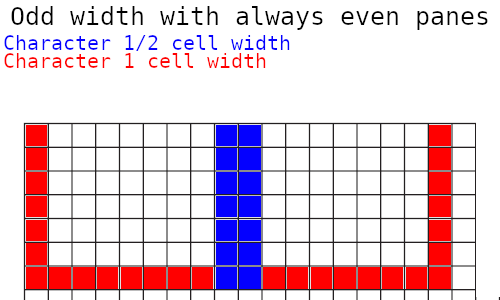
It seems like most TUIs opt to not share borders though (as have I) and go with each pane having separate borders:
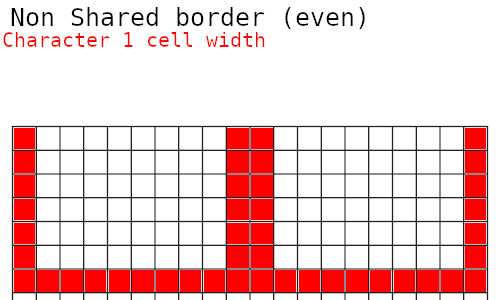
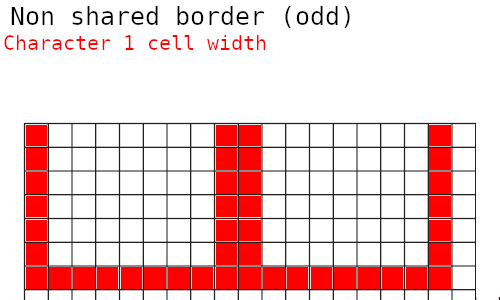
So in order to be consistent between window sizes, the best option is to pare down an already limited working space.
Non-square cells
A cell is approximately twice as tall as it is wide, in my case each cell is 19 pixels high by 10 pixels wide, though the standard was 16x8 for the longest time. This adds to the aforementioned centering problem with the fact that an off-by-one on the height is far more noticeable than an off-by-one on the width. It also means that your x and y axes are at different scales.
Now why would that matter? After all, you're working with characters that take up a cell height and width no matter what.
It matters when you're using one of the new terminal image rendering programs.
Image rendering
Now this is more of a niche issue, if you stick with text it makes things a lot simpler. However the adage of an image being worth a thousand words, although trite, rings true. When I was first dreaming up Feedie, the whole desire of having a thumbnail came from not being able to tell what a video was about by the title alone, which is an exacerbated issue on Youtube, but that's a whole different subject.
It just proves to be useful from time to time, and there are programs to make it relatively simple.
However, like all things in the Linux space, there are a few options for you to work with that all work a little different and have their upsides and downsides.
Kitty
I think kitty's image protocol is the best currently existing method. Of course, you have to use a terminal that supports it, but quite a few do. It's just one command to draw an image, and one command to clear an image. You have to make sure that the stdout of the thread that runs the command is the stdout of the window you are outputting to, which adds some frustrations, but for the most part it just works. However it is not perfect, and still glitches out from time to time.
Ueberzug
Ueberzug has its own quirks. Despite what documentation might have you believe, images are not drawn centered within their canvas size. Due to the non-square cell issue, any offsets to make images centered requires one to make calculations using the image aspect ratio and the cell aspect ratio. It's a real pain in the ass and adds complexity, requiring the drawer to parse this information.
There's also the new(er) Ueberzugpp, a c++ reimplementation of ueberzug as the original developer ragequit. I have yet to try it nor know if it has the same centering quirks.
Chafa
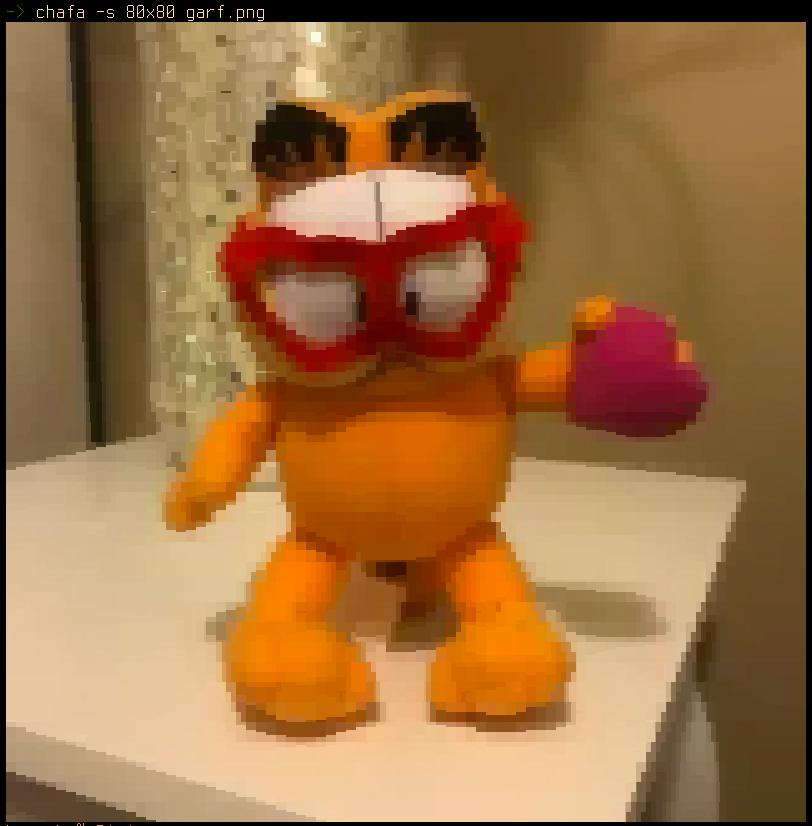
When it is not just calling the kitty protocol in the background, something it now supports, images look like this (80x80 cell resolution):
original:
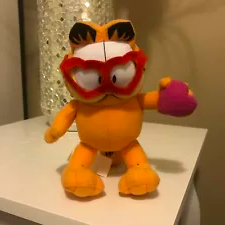
So image quality is significantly degraded even when it takes up the full terminal window.
Others?
There are a handful of other options, but these are the major players for terminal image rendering today. W3m-img used to be in that list, but with how poorly it worked, it no longer is really in the running.
Wrapping
In a terminal's normal context, if one line is too long to be expressed on a single row, it is moved down to the next. In most cases this is fine and good. In the case of TUIs, this is the bane of our existence.
Go's bubbletea library handles this intelligently and does all wrapping handling in the background. NCurses does not. Now it's not the end of the world to work around, but it is a real pain to do it in a way that do
esn't cut off a word half way through. Again, there are libraries for handling this too.
This becomes more apparent when you remember that most TUIs only redraw characters that have changed, not a full redraw of the screen, so if there is one stray wrapping line, or unexpected new line it can do this:
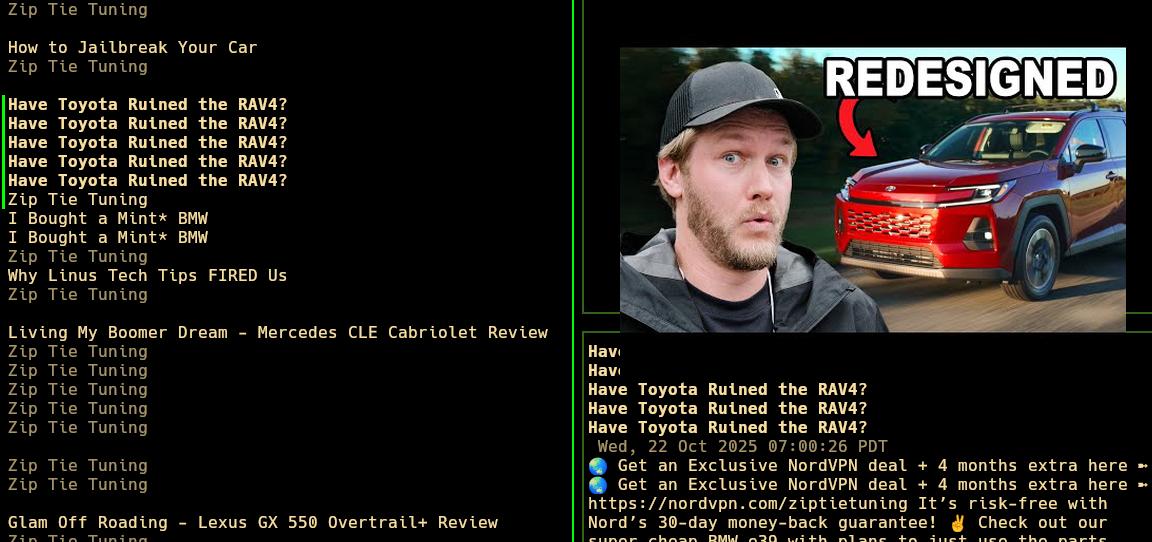
This is an existing bug in Feedie, I'm not sure why it happens. It only happens when using the kitty image backend and so far I have not found any other images that cause this phantom newline to be printed. Nothing is printed to stdout or stderr either. The weirdest part is that it only happens on certain window resolutions.
Conclusion
TUIs are awesome and come with a great deal of advantages. They bring the simple interfaces of GUIs with the portability and simplicity of a terminal. They also inherit a lot of downsides stemming from their half-century old history. You have to count on the developer to account for edge cases.
I'm sure I'd have my own bucket of complaints for GUIs if I was more well versed in writing true GUI apps. However, my experience with web programming has not given me the same frustrations.
But that's not gonna stop me from using and loving them!!